
What an answer costs
Gistr charges for the AI work an answer really takes. Three things decide the cost:- The model. Frontier models cost more than Fast ones. See Models in Gistr.
- The effort. Max thinks longer than Fast, so it costs more. See Fast, Standard or Max.
- The length of the work. A long answer, or one that reads many sources or uses many tools, costs more than a short one.
What uses credits
- Chat answers on any model
- Artifacts, such as presentations and documents
- Deep Research reports
- Study material made on a model other than Study Space’s Auto
- Source processing on the Free plan: 5 credits for each new source, charged once
What never uses credits
- Errors on Gistr’s side. If an answer fails because of a problem on our side, you see “Something went wrong on our side. Your credits weren’t used”.
- Failed Study material. If a reading, flashcard set or quiz fails to generate, its credits come back.
- Study material on Auto. Gistr’s study model makes study material at no credit cost.
- Source processing on paid plans. Adding a source costs nothing on Curious, Explorer and Thinker.
- Audio files. Uploading an audio file never costs processing credits, on any plan.
- Connecting an assistant over MCP and reading your library from it. See What your assistant can do.
Monthly credits, rollover, bonus and top-ups
Your balance can hold four kinds of credits:
Gistr spends bonus credits first, then monthly credits, then rolled-over credits, and top-up credits last. The Free plan has no rollover, and moving to Free clears any rolled-over balance. Top-up credits do not count toward the rollover limit.
The AI Usage page
Open Settings, then AI Usage. You can also select Credits Remaining in the profile menu.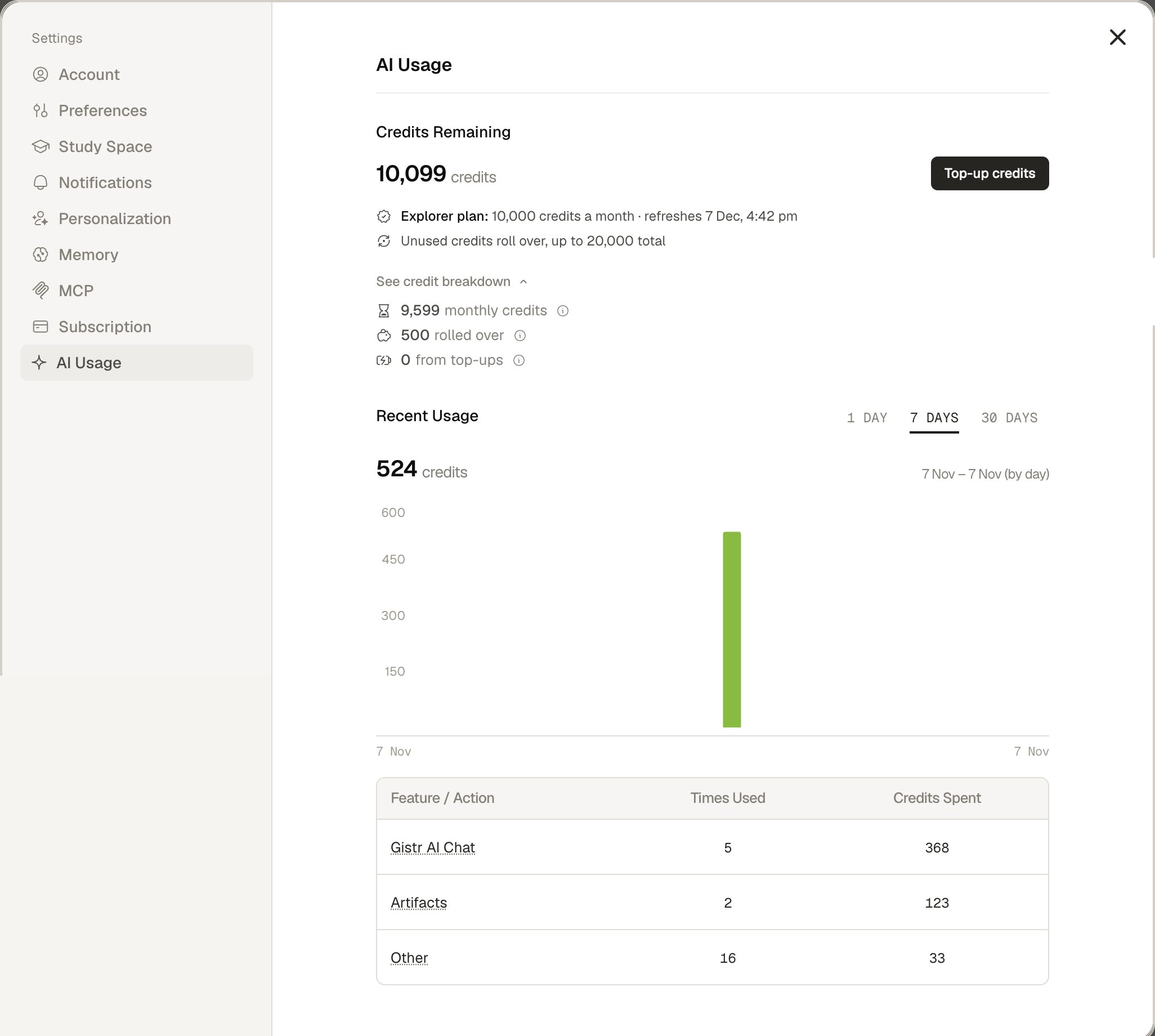
The AI Usage page
- Credits Remaining shows your balance, your plan’s monthly credits and the date they refresh. Select See credit breakdown to split it into monthly credits, rolled over, bonus credits and credits from top-ups.
- Recent Usage lists each feature with Times Used and Credits Spent. Switch between 1 Day, 7 Days and 30 Days.
- The button next to your balance reads Top-up credits, Upgrade plan or Change plan, depending on your plan.
When you run out
On Free you see “You’ve used this month’s free credits.” with an Upgrade button. On a paid plan you see “You’ve used this month’s credits.” with Buy more credits or Change plan. Your library stays as it is: only AI features pause until your credits refresh.How do I get more usage?
1
Spend less per answer
Use Fast effort or a Fast model for routine questions, and Study Space’s Auto model for study material.
2
Top up
On a paid plan, buy a top-up pack from AI Usage. Top-up credits never expire.
3
Upgrade
Move to a higher plan for more monthly credits and a higher rollover limit. See Plans and passes.