
Contact support
1
Open the profile menu
Select your profile in the sidebar.
2
Select Contact Support
A support chat opens inside Gistr.
3
Write your message
Say what you were doing, what you expected and what happened. Add the thread name if it is about one thread.
Report a problem with an answer
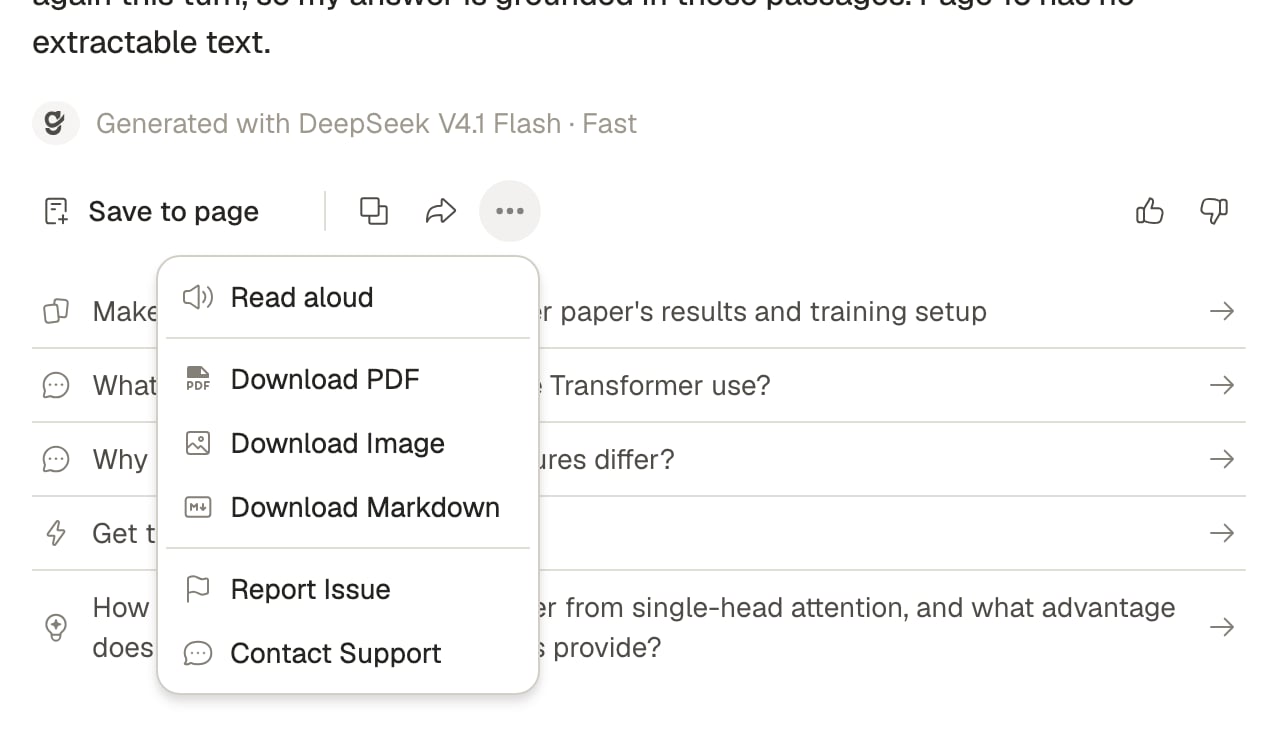
Report Issue and Contact Support under an answer
1
Find the answer
In the chat, go to the answer that went wrong.
2
Open More options
Select More options under the answer.
3
Report it
Select Report Issue to open the feedback board in a new tab, or Contact Support to message the team.
Rate an answer
Use the like and dislike buttons under an answer to tell Gistr whether it helped. Gistr shows “Thank you for your feedback!” when it is sent. The same buttons appear on a source’s Smart Guide.Join the community
- Discord. On a paid plan, open Settings, then Subscription, and select Join the Community.
- Reddit. Gistr’s community is r/Gistr_so.
Before you write
Many questions have an answer already:How credits work
What uses credits, rollover and the AI Usage page.
Plans and passes
Prices, limits, top-ups and discounts.
Settings and account
Theme, voice, language and deleting your account.
Questions people ask
Short answers to common questions.