
Where to find it
The effort button sits in the bottom row of the chat composer, next to the send button. It shows one, two or three dots, and on a wide composer it also shows the name of the effort.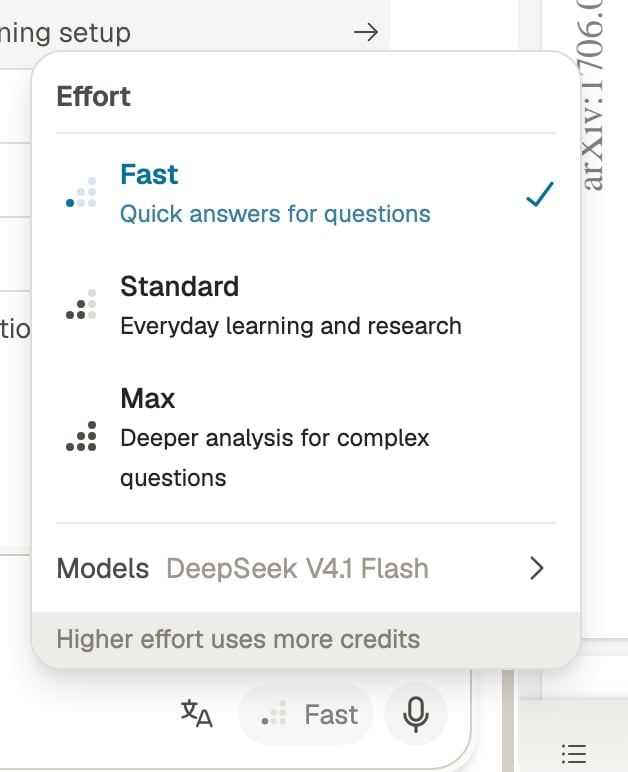
The effort picker in the composer
1
Open the picker
In a thread, select the effort button in the composer. The Effort list opens.
2
Pick an effort
Select Fast, Standard or Max. A tick marks the one you use now.
3
Ask your question
The effort applies to your next message and stays until you change it.
What effort changes
Effort changes how much the model reasons before it writes. It does not change which sources the AI reads or which tools it can use.- When you pick a named model, effort changes only how much that model thinks.
- When you use the Default model, effort also decides which model runs the answer. The model roster lists what the Default runs at each effort.
- Deep Research reports have their own settings, so the effort button does not change them.
What it costs
There is no fixed price per effort. Gistr charges credits for the AI work an answer really takes, so a reply that thinks longer uses more. The picker reminds you: Higher effort uses more credits. See How credits work for the details.Which plans get higher effort
- Max is for paid plans. On the Free plan, Max shows a lock, and selecting it opens the upgrade window.
- Fast and Standard are on every plan, but a plan can only use the models it includes. When a row is locked for the model you picked, try another model or upgrade.