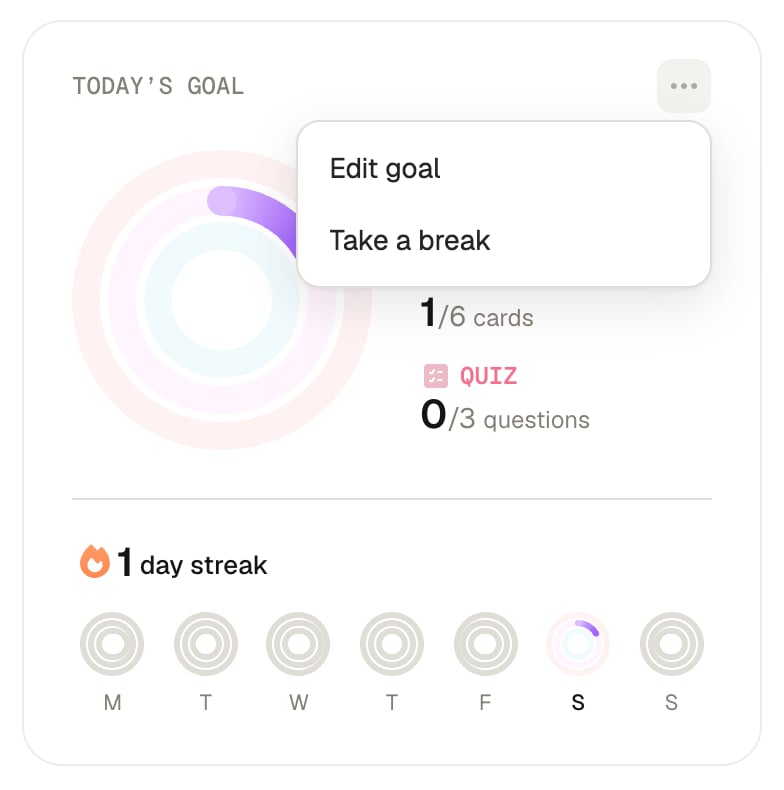
Study Space gives you a daily goal, a streak and reminders so a few minutes each day add up. You set them in Settings under Study Space. Today’s goal in Study Space shows your progress as three rings: Read, Flashcards and Quiz. To open the settings from Study Space, open the Today’s goal menu and select Edit goal.
Today's goal panel with three progress rings, the streak count and the Edit goal and Take a break options

Today's goal with its rings and streak

Daily goals

Daily limits

Under Daily Practice, How should we pace your daily practice? sets the most a day can ask for. A day with less to do asks for less.
  • Reading: 1, 2 (default), 3 or 4 a day, or a custom number from 1 to 10
  • Flashcards and Quiz: 15, 30, 45 or 60 a day, or a custom number from 10 to 500. Defaults are 30 flashcards and 15 quiz questions. Reviews come first, then new cards.
Under Others, New material pace (Slow, Normal, Fast) sets how quickly new cards join your reviews. My day ends at sets when a new study day starts, from 2:00 am to 6:00 am. Each Monday, Gistr can suggest raising or easing your flashcard and quiz limits, based on last week. You can accept or keep your limits.

Streaks and rest passes

Your streak counts the study days in a row on which you met your streak goal. Days off and break days are skipped: they do not count and do not break the streak. You earn one rest pass for every six days you meet your daily goal. You can save up to two. If you miss a study day, Gistr spends a saved pass and your streak stays. Rest passes cannot be bought.

Breaks

Going away? Open the Today’s goal menu and select Take a break, or find it under Others in Settings. Choose One week, Two weeks or Until a date (up to 90 days). Reviews and reminders rest until the break ends. You can end it early.

Catch-up after missed days

If you miss two or more study days, Gistr does not show one big pile of overdue cards. It offers a Catch-up instead: spread the backlog over 3, 5 or 7 days, with one marked as recommended. During a catch-up, new material pauses and the cards closest to being forgotten come first.

Exam pace

A plan with an exam date shows how many minutes a day get you ready in time, and whether you are On track or behind. See Build a study plan.

Reminders

Under Reminders, When do you like to learn? sets the time of your daily reminder. Pick a time, or a study moment: Morning Focus, On the Go, After Class or Work, Before Bed, or Add my own. Choose where reminders reach you in Settings under Notifications. Study reminders covers your daily review and exam countdowns. Study sets tells you when material is ready, and Study progress covers streaks and your weekly recap. Each one can go to the bell in the app, by email, or both. Quiet hours hold emails until they end. The bell never waits. To start over, use Reset Study Space Settings under Reset.

Try it

In Study Space, open the Today’s goal menu, select Edit goal, and choose a Streak Goal.