Every claim that comes from one of your sources carries a citation pill. The pill points to the exact moment, page or passage the AI used. Hover over it to preview the passage, or click it to jump there in the source.

What a citation looks like

Each pill shows the source’s number from your source list, plus a pointer that depends on the source type.

Preview before you click

Hover over a citation pill to see a card with the source’s thumbnail, title, author or channel, date and the quoted text.
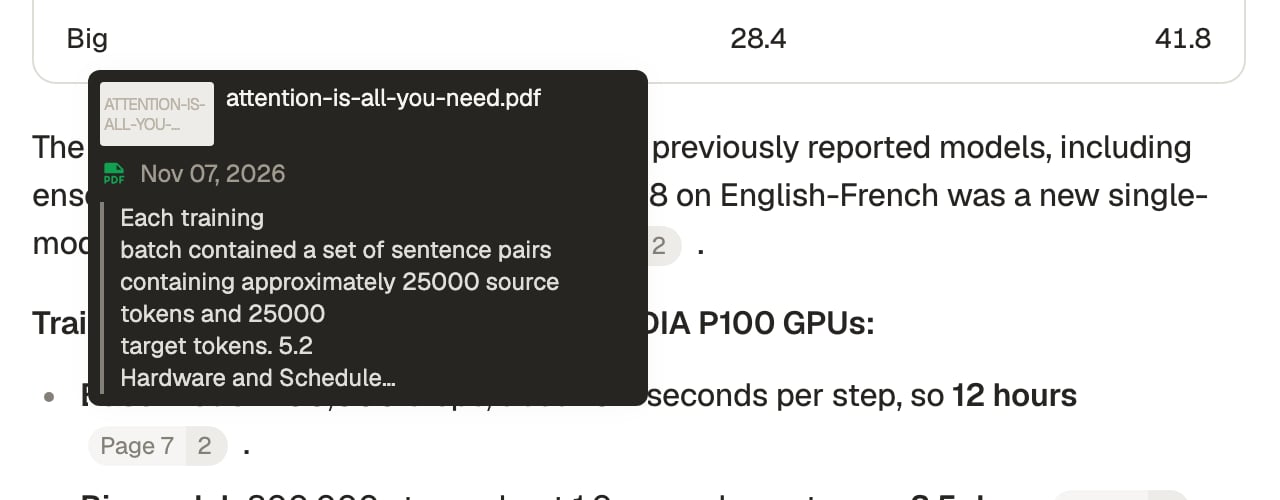
Hovering a page citation in a Gistr AI answer shows a card with the source name, date and quoted text

Hover over a citation to see the quoted text

If you deleted the source or moved it out of the thread, the card shows Source Unavailable.

The PDF flash

Click a PDF citation and Gistr opens the PDF beside the chat at the cited page. The whole passage flashes in yellow for a few seconds so you can find it on the page. If the exact words cannot be matched, Gistr finds the passage by its opening words instead.

Citations from the web

When the AI adds information from a web search, it does not mark that part with a source pill. The answer says which part came from the web. A web citation shows the site’s domain. Hover over it and click Add to sources to make that page a source in the thread. See Your sources, the web, or both?.

The “Generated with” label

Under each finished answer, a line reads Generated with followed by the model name, and the effort level (Fast, Standard or Max) when one is set. It tells you which model wrote the answer. The label is hidden while the answer is still writing and on answers that create an artifact. To learn what the names mean, see Which model am I talking to? and Fast, Standard or Max?.

See how the answer was made

Above the answer, the header shows how the AI worked, for example Answered from 3 sources. Click it to open the steps the AI took. See Let Gistr AI do the work for more on these steps.

Try it

Ask a question about a PDF in your thread, then click a Page citation in the answer and watch the passage flash in the PDF.