
Run a guide
- From the Smart Guide panel
- From the message box
1
Open the panel
In a thread, select Smart Guide above the message box.
2
Pick a guide
Select a guide to run it, or open it to see its prompt first.
3
Personalise and generate
Optionally, add a note under Personalize Smart Guide, for example “skip the intro”. Then select Generate.
Make your own guide
1
Start a new guide
In the Smart Guide panel, select Create New.
2
Write it
Fill in Smart Guide Name, Description and Prompt. Say what the output should look like, the tone and the level of detail. If you leave Description empty, Gistr writes one for you.
3
Set the options
Open Advanced options to set the guide’s own settings (see below).
4
Save
Select Save. The guide is private: only you see it, under My Guides.
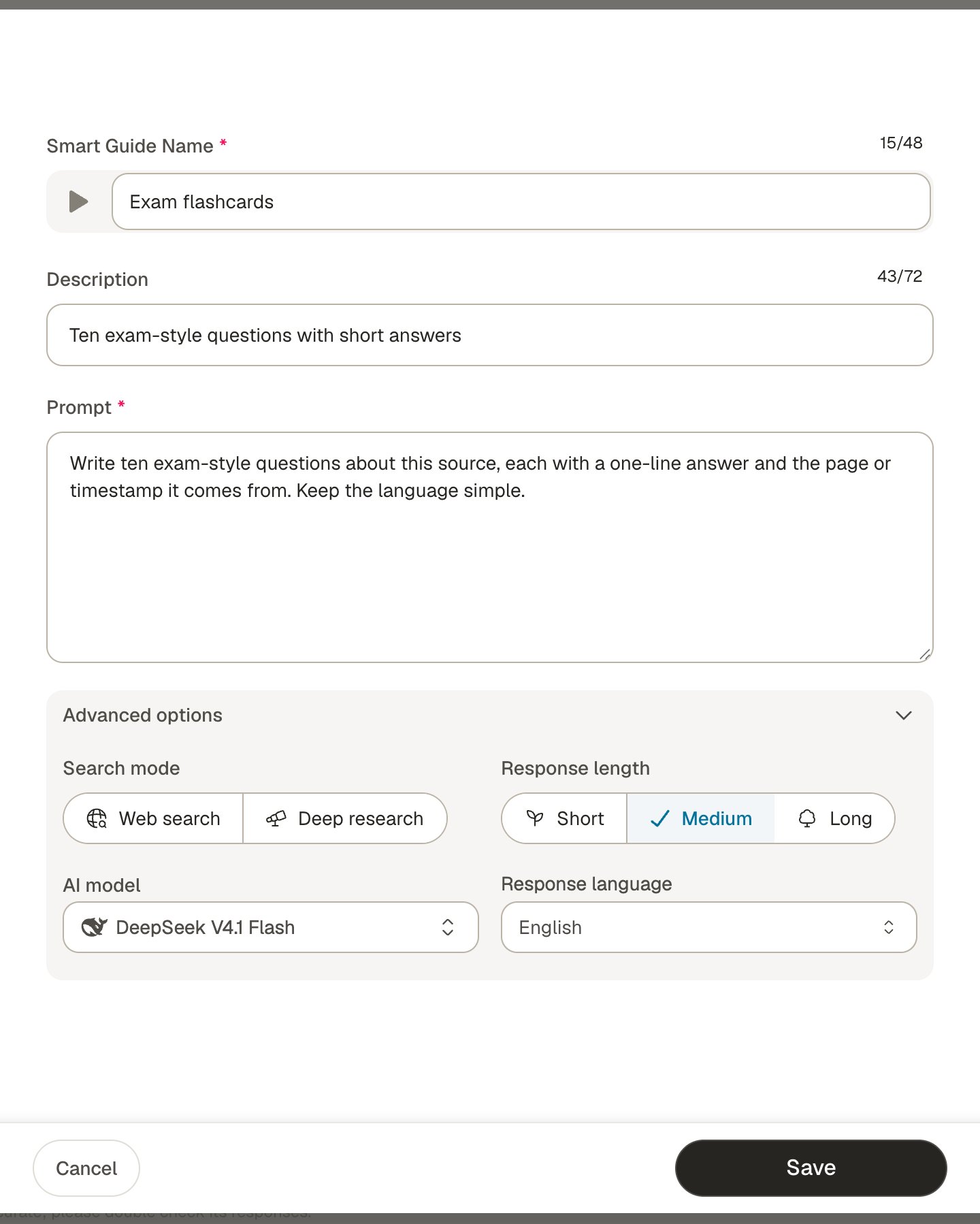
The New Smart Guide form
Settings for each guide
Deep research shows a lock if your plan does not include it. See Deep Research reports.
Remix or duplicate a guide
You do not have to start from nothing. Open any guide from the library:- On a guide by Gistr or by someone else, select Remix. Gistr opens a copy named “(copy)” that you can change and save as your own.
- On one of your own guides, select Duplicate to make a copy, or Edit to change the original.