Deep research is a mode for questions that need more than one answer. Gistr plans the research, sends research agents to search the web and research papers, and writes a long report with citations. The report arrives as a file you can download as DOCX or PDF. Deep research is not on the Free plan.

Run Deep research

1

Turn it on

In the message box of a thread, select Deep research. You can also select Tools, then Deep research, or type /deep research. While it is on, the toggle shows as an outlined Deep research pill, and a line above the box says Deep research uses more credits than a standard answer.
2

Ask your question

Write the question as fully as you can: the scope, the time period and what you will use the report for. Then send it.
3

Wait for the report

Gistr shows its progress while it works. A report can take many minutes. When it is done, the chat shows Preparing your research report as DOCX and PDF, then the report.
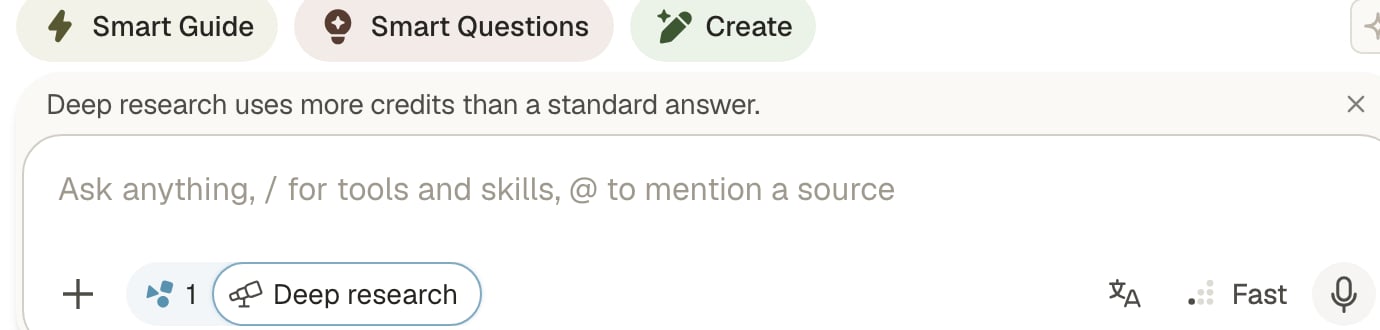
The thread message box with the Deep research pill turned on and a note that it uses more credits

Deep research turned on in the message box

To go back to normal answers, select the toggle again. Web search stays on for normal answers, so you do not need Deep research for a quick fact.

What happens during a run

  1. Gistr breaks your question into parts and plans the research.
  2. Research agents search the web, news and research papers for each part, and read the pages they find. Papers are marked peer-reviewed or preprint.
  3. Gistr combines what they found and writes the report, with numbered citations to its sources.
Deep research runs at its own settings. The effort you picked for chat answers does not apply to it.

Download the report

The report shows in the chat like a document artifact. Open the download menu and select Download as PDF, Download as DOCX or Download as Image. For other export options, see Export your work. If the report is written but the file fails, Gistr says so in the chat: “The report was generated, but preparing the downloadable file failed.”

Which plans include it

Deep research is not on the Free plan. On Free, the toggle shows Upgrade to use deep research and the Tools menu shows a lock next to it. Paid plans include it. See Plans for what each plan includes. A run uses more credits than a normal answer. The cost depends on how much research it does. See How credits work.
You can also make a skill that always runs with Deep research: set Search mode to Deep research in its Advanced options.

Try it

In a thread, select Deep research and ask “What does recent research say about spaced repetition for adult learners?”